One system for the whole safety program.
Migna replaces the binders, spreadsheets and scattered apps with a single health & safety platform — incidents and OSHA logs, audits, training, permits, observations, chemicals and equipment inspections — that works from the office to the floor and the field.
Two and a half minutes, no sales call.
A walk through the product on sample data. Captions, no sound. When it ends, the live demo is the same screens with you at the controls.
Read the tour instead
- This is Migna. One system for a contractor's whole safety program: incidents, training, audits, permits, observations and the OSHA records.
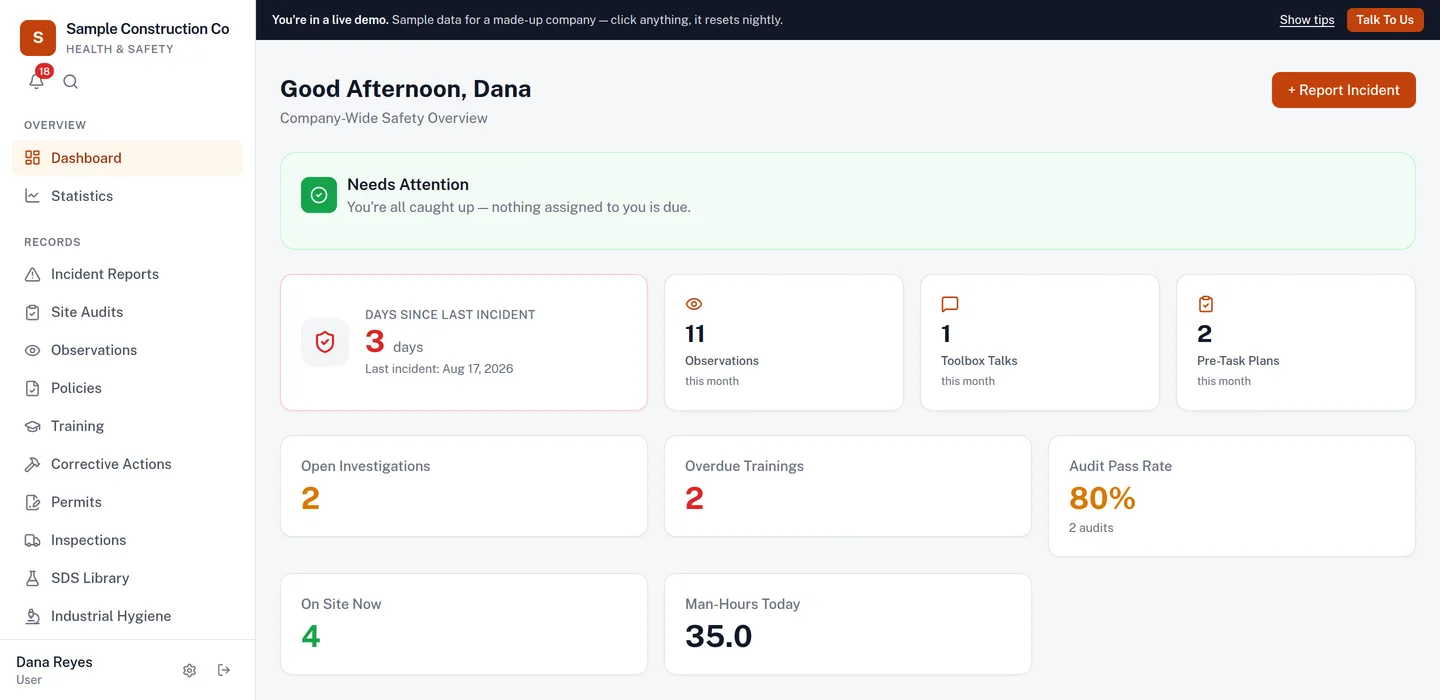
- This is a sample company. Everything you will see is invented data on a live copy of the product.
- Every incident is recorded once, with the people, the site and the photos, and it is the record everything else hangs off.
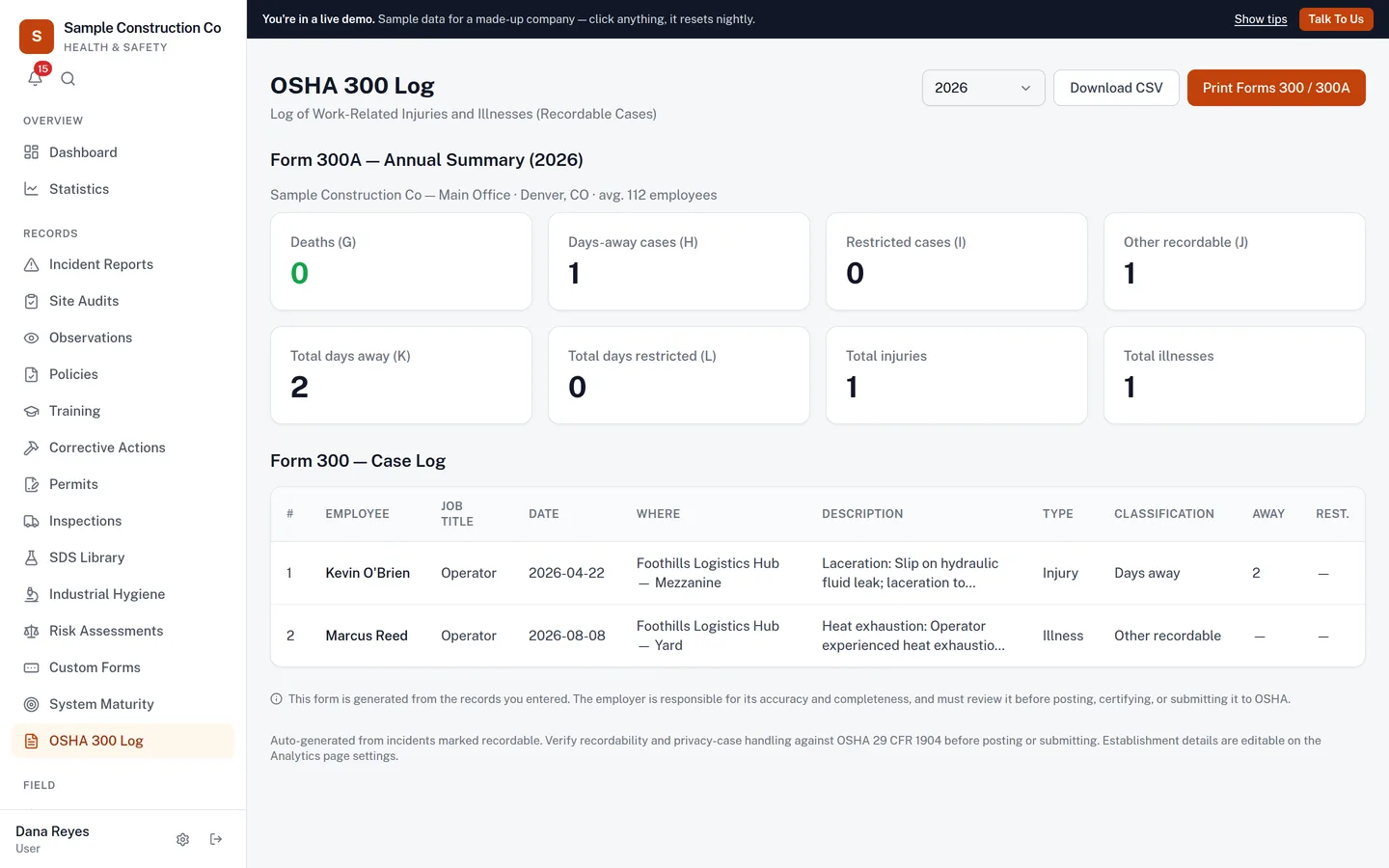
- The OSHA 300 log and the 300A summary are built from those records. Mark what you have determined is recordable, and the log fills in.
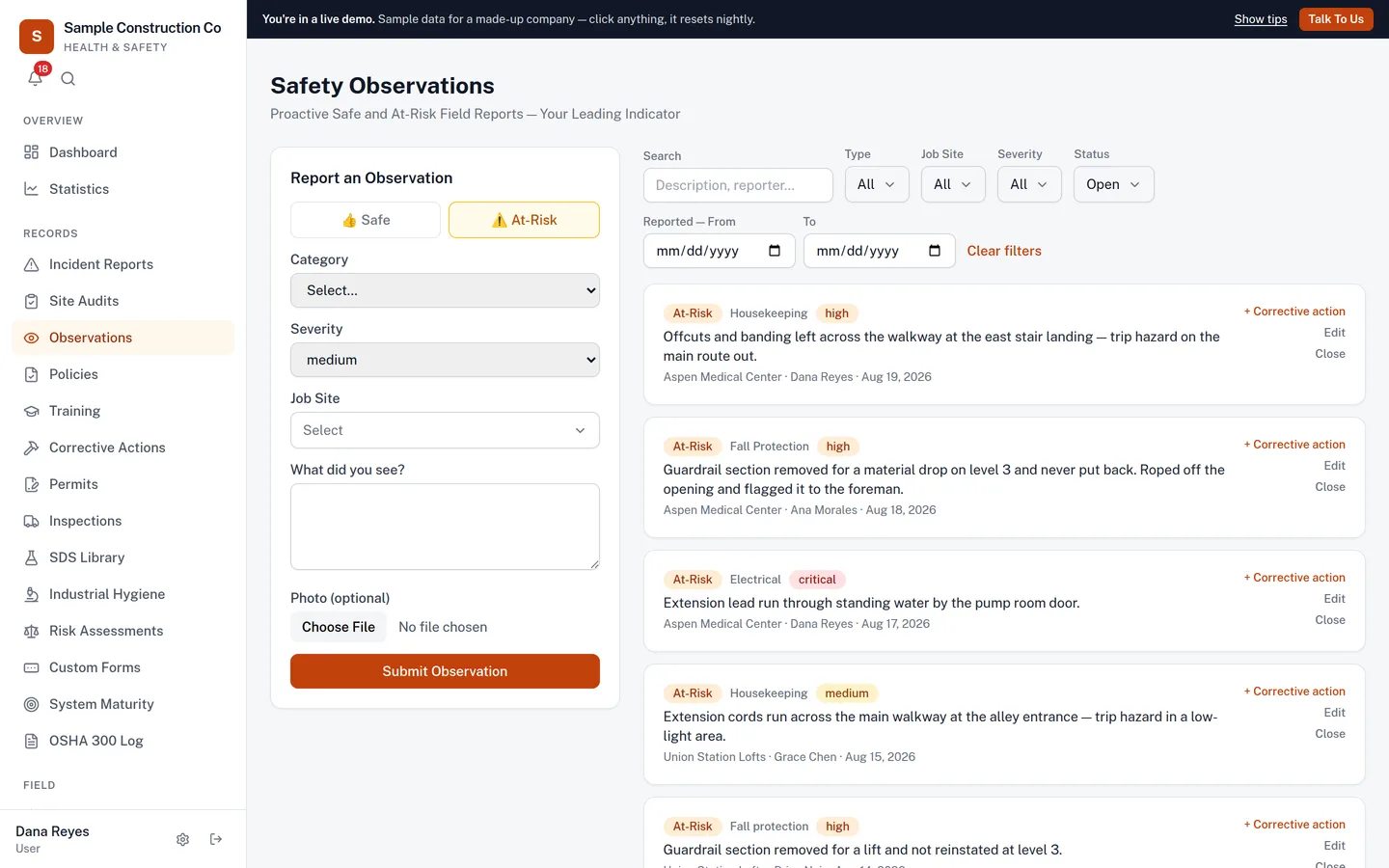
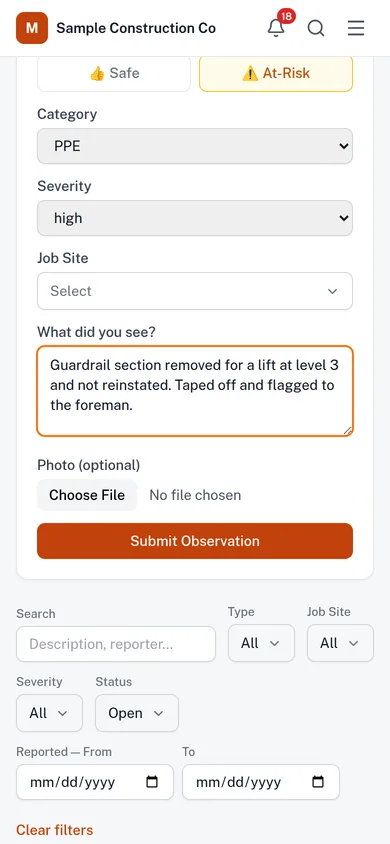
- Observations are the number that moves before the incident count does: hazards, near misses and good catches from the field.
- Crews report from a QR code posted at the site. No login, no app to install, and it works in English or Spanish, offline too.
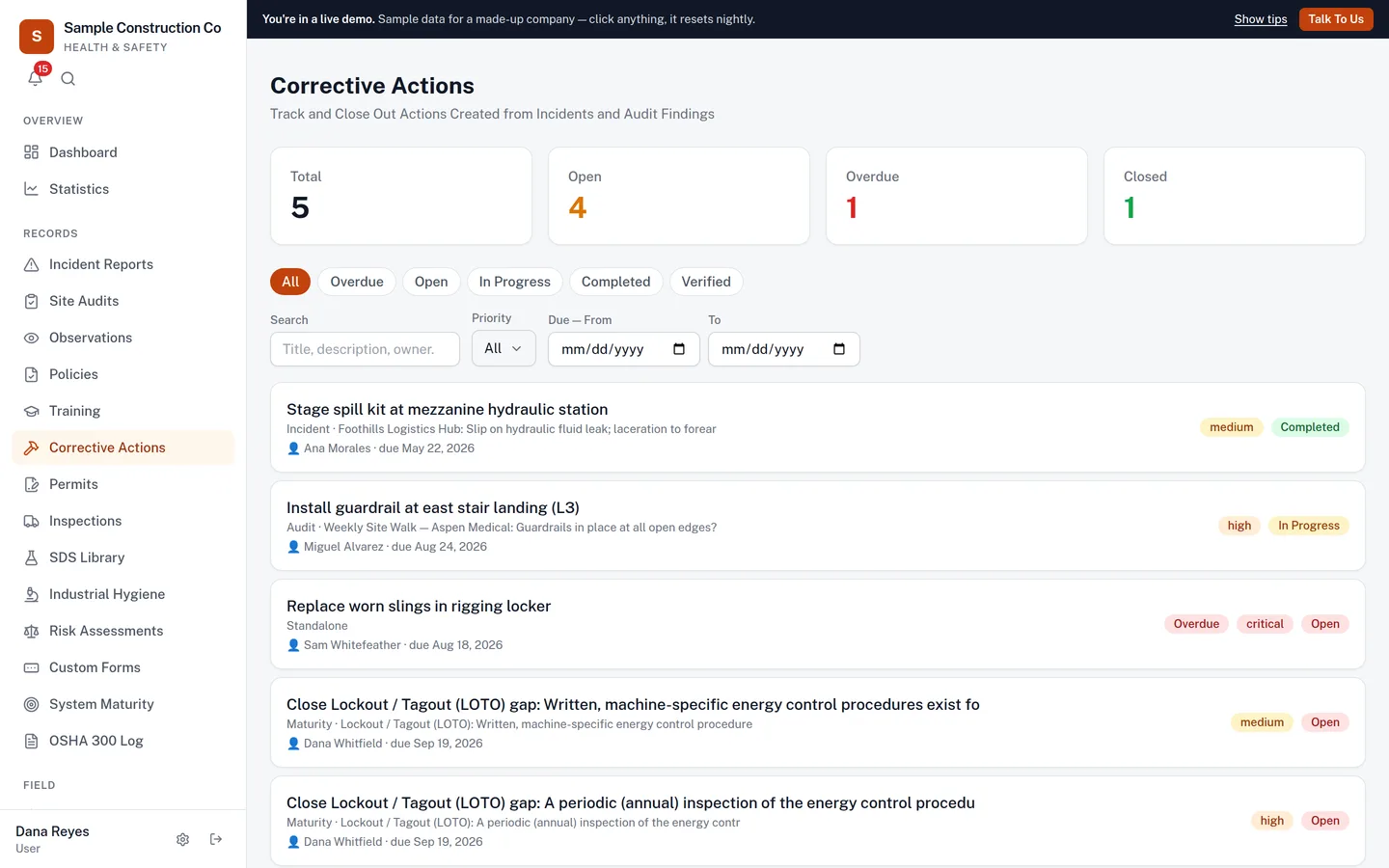
- Findings become corrective actions with an owner and a due date, and reminders go out until each one is closed. An action left a week past its due date is emailed to your admins, once, so it cannot sit quietly.
- The daily pre-task plan: what the crew is doing, what could hurt them, and who signed. The document a GC asks for first.
- Site sign-in and muster from the same QR code, so you know who is on site right now without handing out logins.
- Training and certifications: who is current, who expires next month, and the reminders that go out before it lapses.
- Subcontractor prequalification. Each sub uploads insurance, EMR and their safety program through their own link, and you see the gaps.
- Site audits and inspections on a schedule, scored, with the failed items flowing straight into corrective actions. Start from our library of forklift, aerial lift, scaffold, ladder, vehicle, fire extinguisher and site-walk checklists, each written to the OSHA standard it cites.
- The optional AI add-on writes toolbox talks and job hazard analyses in English or Spanish, looks up the hazards and controls for a task, tool or piece of equipment, and turns a spoken note into a draft report.
- Weather and heat by site, so the foreman knows before the crew does.
- Your data lives in your own database, not a shared one. It exports to CSV at any time, and your crews never need a login.
- Priced by the people on your roster, from $249 a month. Walk the live demo yourself at app.mignasafetysolutions.com/demo.
Stop counting only the incidents you couldn't prevent.
Most safety programs live in the rear-view mirror — they log what already went wrong. Migna gives you the leading indicators too, so problems get fixed before they become recordables.
📉 Lagging — after the fact
- Incidents, injuries and illnesses
- OSHA 300 / 300A recordables
- Lost-time and property damage
- The number you report after it's too late
📈 Leading — before it happens
- Safe & at-risk observations from the whole crew
- Near-misses captured in ~20 seconds
- Corrective actions assigned, tracked and verified
- Training, permits and inspections kept current
Why this shows up on the invoice
Leading indicators aren’t only the right thing to track — they’re the part of a safety program an underwriter can actually see. Documented observations, closed-out corrective actions and current training are what a broker takes into a renewal. Fewer recordables move your experience modification rate, and your EMR multiplies your workers’ comp premium every year it stays where it is.
For a contractor it decides more than price. Plenty of general contractors won’t let a sub on site above a 1.0 — so the paperwork isn’t only what you show an inspector after something goes wrong. It’s what gets you on the job in the first place.
Migna keeps the record. What your EMR does with it depends on your program, your people and your losses — we’re not going to pretend software is what changes that number.
Why teams move off the binder — and off the other software.
Most safety platforms make you choose between the office and the field. This one runs the whole program from both.
Built by a software company that has read about safety, with a safety advisor on a call once a quarter.
Built by a safety professional who kept these logs on a live site.Every screen here started as a spreadsheet maintained on a live site — the OSHA log, the training matrix, the corrective actions nobody chased. We built the thing we wanted at 4pm on a Friday with an inspector due Monday.
Your safety data sits in one big shared database with every other customer’s.
Your own database, and your own deployment.Single-tenant, one customer per installation. Nobody else’s data is in the same place as your injury records — and when you leave, we delete an instance rather than rows in a table.
Every person who touches safety needs an account, a password and a seat on the invoice.
Your crew never needs a login.Post a QR code. People scan it to report a hazard, sign in to a site, complete an induction, sign for a policy or take a short training course — on their own phone, no account, nothing to remember.
The app is useless in a basement, a plant room or anywhere without bars.
It works with no signal at all.Incidents and observations save on the device, photos included, and upload themselves when the phone reconnects. Nobody has to remember to go back and do it later.
AI means a generic chatbot bolted to the corner that knows nothing about your sites or your records.
The AI works from your own records.Ask the assistant about your sites and it answers from your live records, then drafts the corrective action or observation for you — nothing is saved until you press Confirm. Photograph a hazard and get the findings. Drop in a supplier’s SDS PDF and get a filled-in record. Say what happened into the phone, in English or Spanish, and get a report you can edit and sign.
Weather is somebody’s phone app, and the call gets made by whoever is nearest the window.
Severe weather and heat alerts, per site, on every tier.Thresholds you set, watched against the National Weather Service, delivered by email or in-app (SMS available as an add-on), with animated radar and about 30 minutes of forecast on the map.
A five-figure implementation, a six-week rollout, and a renewal quote you have to argue with.
Nothing to implement, and the price you start on is the price you keep.We import your people and training records from your spreadsheet and set the first sites up with you, at no charge. Support reaches someone who knows the system rather than a ticket queue, within one business day.
One place for the whole safety program.
We turn on the modules you need. Everything shares the same workers, job sites and reporting.
Records & compliance
Incidents with AI-assisted write-ups, a five-whys investigation and return-to-work tracking with restrictions, site audits, the OSHA 300 log and industrial-hygiene sampling — all audit-ready, with comment threads and @mentions on each record and custom reports you build and save across them.
- Incidents
- Audits
- OSHA 300/300A
- Ind. Hygiene
People & program
Training and certifications with expiry tracking, scheduled sessions with email reminders, short courses taken from a QR code with an optional quiz, toolbox-talk sign-offs, versioned policies that everyone signs again when they change, and a management-system maturity score.
- Training
- Certifications
- Policies
- Maturity
Field & hazards
Observations, corrective actions, work permits, the SDS library with Tier II screening, recurring equipment inspections starting from checklists written to the OSHA standards, and ergonomics assessments that run a lift through the NIOSH lifting equation and score posture and repetition, and management of change, so nothing new goes live on site until it has been reviewed, approved and checked off.
- Observations
- Permits
- SDS / Tier II
- Inspections
It works where the work happens.
No signal, no problem. Migna is a mobile-first app that installs on any phone and syncs when it reconnects.
Offline drafts
Report an incident or observation, walk a site audit or record an equipment inspection with no signal — photos included, from the app or from a QR code with no login. It saves on the device and uploads automatically when back online.
Geo-tagged photos
Incident and observation photos capture where they were taken, with a map link on the record.
QR no-login reporting
Post a QR code on site; crews scan it to submit a safety observation without an account — and it still works with no signal.
Install like an app
Add to home screen. The fastest way to report from the field or run the AI hazard camera.
SDS that still opens underground
Once a phone has loaded the chemical list, safety data sheets and policy text stay readable with no signal — the plant room and the trench being exactly where both get needed.
Branded reports
Export audits, JHAs and toolbox talks as clean PDFs with your logo on them.
Site weather & alerts
Heat index and severe weather per site, with radar and about 30 minutes of forecast, and crew alerts by email or in-app — SMS as an add-on.
Records you can defend, data that stays yours.
Recordkeeping done right
Recordable incidents populate the Form 300 and 300A automatically and print on the exact official forms. Every case on the log is kept for the five years 29 CFR 1904.33 requires; we refuse to delete it early, even for an admin.
Locked when it counts
Closed incidents are read-only, and recordable/severe cases require an admin to edit — so an official record can't be quietly changed.
SDS & Tier II screening
Keep your SDS library searchable and screen inventory against EPCRA thresholds as a Tier II aid. Each record carries the sheet’s handling, storage and disposal sections, read out of the PDF by the AI add-on or typed in.
Single-tenant by design
Each customer gets their own dedicated database and deployment — your safety data is never mixed with anyone else's.
Your data, exportable
Role-based access, an activity log of sensitive actions and a one-click full export of everything you've entered.
The full security page
Where the data lives, how it is protected, every sub-processor, and what we do not have yet — no SOC 2, no penetration test to date. Read the security & data handling page →
Four things you can use right now.
No account, no email, no trial. They are the same calculations Migna runs inside the product — published on their own so you can check our working before you trust us with anything.
Is it recordable?
Walks 29 CFR 1904 in the regulation's own order and cites the section for every answer. Says need more information rather than guessing — because "not recordable" is the assumption that costs you a citation.
TRIR & DART calculator
TRIR, DART, LTIFR and severity, with the formula shown for each. It refuses rather than defaults when hours are missing, and it will not invent an EMR — that comes from a rating bureau, not from incident counts.
Heat index & work-rest
The NWS regression plus OSHA-NIOSH work-rest cycles, including the full-sun adjustment most people miss — the chart is a shade measurement, and a crew on a roof is in a different band.
OSHA program gap analysis
Plain questions about your written programs, training records, recordkeeping and inspections. Every gap rated and cited to the section it rests on, with a prioritized plan you can print, export, or import into Migna as corrective actions.
Priced per company, not per seat.
Each tier includes the modules listed; we enable them for you at setup. Your tier is set by how many people are on your roster — anyone whose training and records you track, office staff included. Logins are free and unlimited. Every tier includes $0 implementation and free data migration: we import your workers and training records from a spreadsheet and set the first sites up with you. No setup fee, and no renewal increase: the price you start on is the price you keep.
Field
- Incidents & OSHA 300 / 300A / 301
- Return to work & restrictions
- Observations & near misses (QR, no login)
- Site audits & safety inspections
- Corrective actions
- Comments & @mentions on records
- Statistics & custom reports
- Training & certifications, with scheduled sessions, QR courses & quizzes
- Permits — hot work, confined space, LOTO
- SDS library & Tier II screening
Crew
- Site sign-in, emergency muster & per-site emergency plans
- Daily pre-task plans
- Subcontractor onboarding
- Custom forms
- Risk assessments & ergonomics (NIOSH lifting equation)
Company
- Contractor prequalification
- Management of change
- Read-only REST API & webhooks
- Equipment & vehicle inspections
- Industrial hygiene
- Management-system maturity
- Policies with version history & re-acknowledgment
- Weekly leadership & per-site summaries
Available on any tier.
Hazard camera, hazard lookup, voice notes that become reports, JHA and toolbox-talk drafting, SDS extraction, one-press summaries of incidents and policies, and an assistant that answers from your records and drafts corrective actions and observations for you to confirm.
2,500 messages included, then $0.03 each.
The things people ask before they start.
Do our crews need logins?
No. Workers never get accounts. They report a hazard, sign in to a site, complete an induction, acknowledge a policy or take a short training course by scanning a QR code on their phone — no app, no password, nothing to remember. Logins are for the office and your site leads, and those are unlimited and free.
What happens on a site with no signal?
Incident reports, safety observations, site audits and equipment inspections save on the device and sync when the phone finds a connection again, so a basement mechanical room or a rural site doesn't cost you the record. That covers both the app and the no-login QR page. Safety data sheets and policy text stay readable offline once a phone has loaded them.
What does "single-tenant" actually mean?
Your company gets its own database and its own deployment, not a row in a shared table with a customer ID on it. Nobody else's data is in the same place as yours, and there is no query anyone could write that would return both.
What happens to our data if we stop using Migna?
You export it — one click, everything you've entered, in open formats you can read without us. What happens to the copy we hold afterwards is written into the data processing agreement rather than left to goodwill.
How does pricing work?
Per company, by how many people are on your roster — anyone whose training and records you track, office staff included — not per seat. Logins are free and unlimited, and crew never need one. Every tier includes implementation and data migration at no cost, and the price you start on is the price you keep.
Does it integrate with Procore, or our accounting system?
Not natively yet, and we would rather say so than let you find out later. There are no ready-made connectors today — no Procore, Autodesk or ERP connector. What we do have: a read-only REST API on the Company tier, so your own systems can pull incidents, corrective actions, audits, inspections, training records, workers, sites and changes with a key an admin makes and can revoke at any time, and signed webhooks that tell them the moment an incident is reported, an action closes or an inspection fails. The developer reference is public at software.mignasafetysolutions.com/developers. We also import your workers and training records from a spreadsheet during onboarding at no charge, every module exports to CSV, and the whole account exports to JSON in one click whenever you want it. So Migna sits alongside a GC's Procore rather than talking to it, and nothing you put in is trapped. If a specific connector is what decides this for you, tell us which one and we will give you a straight answer about whether and when.
Can we build our own reports?
Yes. Custom Reports, on the Statistics page, charts your incidents, observations, corrective actions, site audits, equipment inspections or training records: pick what to group by, split it by a second field, filter it and set the date range, then show it as a bar chart, a line chart or a table. Save it for yourself or share it with everyone who can open Statistics. A saved report keeps its settings rather than its numbers, so a rolling range is current every time it is opened, and an admin can export the table to CSV.
Do you handle management of change?
Yes, on the Company tier. Each change to equipment, a process, materials, a procedure or the site layout is written up with its reason and a hazard review, approved by named people in the order you set, and worked through a pre-start checklist written to the OSHA standards, the items 29 CFR 1910.119(l) lists plus the pre-startup safety review, before it can be marked implemented. Temporary changes come back in reminders before their end date to be reversed or made permanent. Every item can be marked not applicable with a reason, for work outside process safety management.
Can the AI change our records?
Not on its own. With the AI add-on, the assistant answers questions from your live records, and when you ask it to, it drafts a new corrective action, an update to one, or a safety observation. It shows you a card with exactly what will be saved, and nothing is written until you press Confirm. Only the person who asked can confirm, each card saves once, and it cannot delete anything or touch any other kind of record. Every confirmed change is saved under that person's account and noted in the activity log.
What's involved in getting started?
We import your workers and training records from whatever spreadsheet you keep them in, set up your first job sites with you, and turn on the modules you need. You don't configure it alone and you don't pay for the setup.
Does this replace our safety manager or consultant?
No, and it isn't meant to. Migna helps a qualified safety professional organize and document a program — it doesn't supply the judgment. The AI tools and Tier II screening are aids to that person's work, not a substitute for it.
See Migna on your own sites.
Tell us about your team and we'll set up a walkthrough on a clean instance — modules, branding and your first sites configured for you.
Pick a time now, if you like.
Slots run early morning and late afternoon, Eastern, so a walkthrough fits around site hours. Fifteen to thirty minutes, on a clean instance. No pressure — the reply comes either way.
Call or email, and you’ll reach someone who knows the software, not a switchboard.